Before I adopted the iPhone I was a long time Android user, in fact my first iPhone was just last year when Sprint received the iPhone 4S. Despite earlier models not being available on my carrier, the one thing stopping me from making the switch was how notifications were handled; I hated the intrusive pop-up style found in iOS at the time, and was in love with Android's notification tray. Apple's introduction of the Notification Center sold me on the iPhone, and while it is great, there's much room for better functionality and improvement. And a beautiful new concept shows us, and Apple how this can be done.
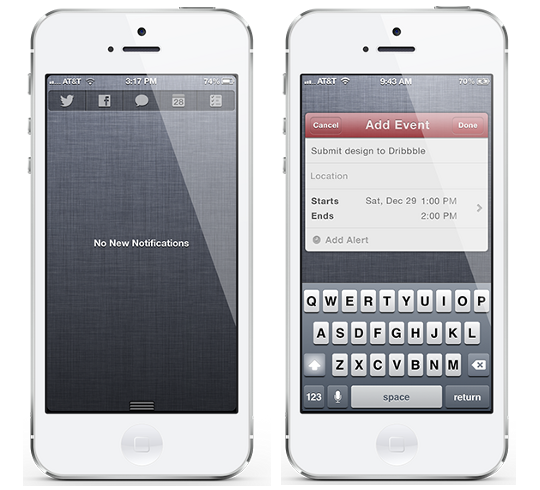
In iOS 6 Apple added new Share Widgets for Twitter and Facebook to Notification Center, and while they're nice features, you can't help but wish they would have expanded on it. A new concept by human interface designer Joshua Tucker does this very thing; in addition to the ability to tweet and post to Facebook from Notification Center, Tucker has added support for sending text/iMessages, making a Calendar Event and setting Reminders.
Instead of text-based widgets, this concept features a beautiful and simple interface with icons for their respective applications. This not only is aesthetically pleasing, but it allows room for more application support, something we're all waiting for. Pressing one of these icons will result in a miniature pop-up of that application (just like the Twitter and Facebook share widgets do now), as seen with the Calendar app in the picture above. Just as you can customize which widgets appear in your Notification Center, this concept features the ability to change which applications are in your share widget.
The developer behind this amazing concept, Joshua Tucker writes:
“Based on my own personal experience, having the ability to quickly add something important like a calendar event in a more efficient way helps me to be more organized, responsible, and productive. Based on human nature, I believe it's the same for everyone.”
He couldn't have said it better if he tried. This exact thing is something I've always dreamed of on my iOS device, it gets a little annoying double pressing that home button over and over again. If you have too, we may not have to dream much longer. Tucker announced that he has made plans to work with a developer in the jailbreak community to make this a reality, but has yet to select who.
Be sure to follow me on Twitter... @Jailbr3akHelper


