Follow us on Twitter

Friday, January 4, 2013

New Notification Center Concept By Joshua Tucker


Before I adopted the iPhone I was a long time Android user, in fact my first iPhone was just last year when Sprint received the iPhone 4S. Despite earlier models not being available on my carrier, the one thing stopping me from making the switch was how notifications were handled; I hated the intrusive pop-up style found in iOS at the time, and was in love with Android's notification tray. Apple's introduction of the Notification Center sold me on the iPhone, and while it is great, there's much room for better functionality and improvement. And a beautiful new concept shows us, and Apple how this can be done.
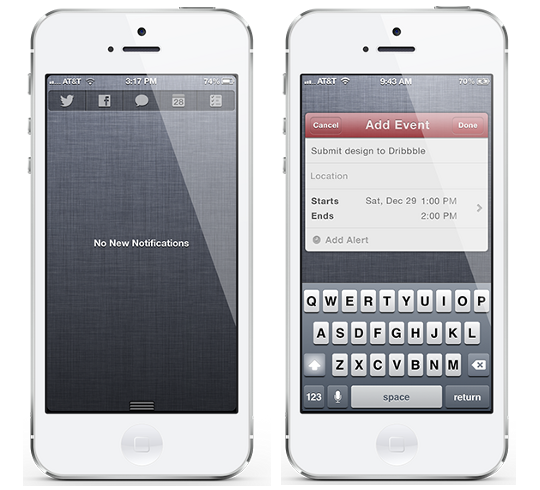
In iOS 6 Apple added new Share Widgets for Twitter and Facebook to Notification Center, and while they're nice features, you can't help but wish they would have expanded on it. A new concept by human interface designer Joshua Tucker does this very thing; in addition to the ability to tweet and post to Facebook from Notification Center, Tucker has added support for sending text/iMessages, making a Calendar Event and setting Reminders.
Instead of text-based widgets, this concept features a beautiful and simple interface with icons for their respective applications. This not only is aesthetically pleasing, but it allows room for more application support, something we're all waiting for. Pressing one of these icons will result in a miniature pop-up of that application (just like the Twitter and Facebook share widgets do now), as seen with the Calendar app in the picture above. Just as you can customize which widgets appear in your Notification Center, this concept features the ability to change which applications are in your share widget.
The developer behind this amazing concept, Joshua Tucker writes:
Based on my own personal experience, having the ability to quickly add something important like a calendar event in a more efficient way helps me to be more organized, responsible, and productive. Based on human nature, I believe it's the same for everyone.”
He couldn't have said it better if he tried. This exact thing is something I've always dreamed of on my iOS device, it gets a little annoying double pressing that home button over and over again. If you have too, we may not have to dream much longer. Tucker announced that he has made plans to work with a developer in the jailbreak community to make this a reality, but has yet to select who.

Be sure to follow me on Twitter... @Jailbr3akHelper 

New Winterboard Theme: Auxo Michel


Cydia_Theme_Default_Icon-Auxo Michel

Name: Auxo Michel
Description: Auxo toggles with original multitasking style.
Version: 1.0
Author: michel00000 (Author of Spanish Toggles and International Toggles.)
Repo: ModMyi
Section: Themes (Apps)
Compatible: iOS 5 – iOS 6.0.1
Price: FREE

Auxo_Michel_Example

Thursday, January 3, 2013

New Winterboard Theme: 'Instagram Colors Icons'


Cydia_Theme_Default_Icon-Instagram Colors Icons

Description: Collection of 5 colors icons.
Version: 1.0
Author: CoOol_BoY (Author of Sneeze Message Tone, Twitter Colors Icons, WhatsApp Colors Icons, and many more.)
Repo: ModMyi
Section: Themes (Springboard)
Compatible: iOS 4.3.3 – iOS 6.0.1
Price: FREE

Instagram_Colors_Icons_Example

New Winterboard Theme: 'Apple Loading Bar Battery Theme'


Cydia_Theme_Default_Icon-Apple Loading Bar Battery Theme

-Description: Custom LockScreen battery graphics.
-Version: 2.0
-Author: iThemesGh (Author of Palestine Siri Mic Theme.)
-Repo: BigBoss
-Section: Themes (LockScreen)
-Compatible: iOS 5 – iOS 6.0.1
-Price: FREE

Apple_Loading_Bar_Battery_Theme_Example

Sunday, December 30, 2012

Cydia Package Updates: 12/30/2012


Thor_Cydia_Icon-Thor

Name: Thor
Description: Configure per-app WiFi activation.
Version: 2.1.0
Author: ClausCartel (Author of AnimateOS, BITEsmsOS, Dogma, and many more.)
Repo: BigBoss
Section: Tweaks
Compatible: Unknown
Change Log: 
*”I have completely rewritten the code. Now, every time you open an application will activate the WiFi, if you do not care WiFi for that application, you can press the pop-up to turn it off. (Pop-up will disappear after 5 seconds independently.”)
(I quoted the change log from Cydia like I always do, so it may have some bad grammar.)
Price: FREE
Thor_Example_1
Thor_Example_2


Thor_Example_3


Iconoclasm_Layout_Maker_Cydia_Icon-Iconoclasm Layout Maker

Name: Iconoclasm Layout Maker
Description: Create, save & manage icon layouts.
Version: 1.7.0
Author: Nolan (Author of Google+ Cydget, iDeb, Silver NotificationCenter Theme, and many more.)
Repo: BigBoss
Section: Utilities
Compatible: iOS 4.3 – iOS 6.0.1
Change Log:
*Added a whole new, “most popular” feature on the uploaded layouts! It sorts the layouts in order by how many downloads they have.
*Fixed download feature being to slow.
*A bunch of other bug fixes for iPad and layout viewer.
Price: FREE
Iconoclasm_Layout_Maker_Example_3Iconoclasm_Layout_Maker_Example_2Iconoclasm_Layout_Maker_Example_1


Cydia_Tweak_Icon-SMSOptions Pro

Name: SMSOptions Pro
Description: Usually you delete your SMS one by one, but with this tweak you have “CleanSMS”, this option lets you delete all of you messages at once.
Version: 1.2
Author: iMokhles
Repo: ZodTTD & MacCity
Section: Tweaks
Compatible: Unknown
Change Log: 
*Localized Settings
*Option New what to CleanSMS. Now it appears alone without pressing “Edit” button and it appears.
*Fixed UnHide/Hide issues.
(Once again I quoted the Change Log from Cydia.)
Price: $.99
SMSOptions_Pro_1.2_2
SMSOptions_Pro_1.2_1


Auxo_Cydia_Icon-Auxo

Name: Auxo
Description: Auxo re-imagines the iOS task switcher!
Version: 1.1-4
Author: A3tweaks (This author only has one package.)
Repo: BigBoss
Section: Tweaks
Compatible: iOS 5.1 – iOS 6.0.1
Change Log:
*iOS 5 compatibility.
* Optimized caching system.
* Performance enhancements.
*Improved snapshot retrieval.
*Fixed Airplane Mode shortcut bug.
*Added tap & hold for mute toggle.
*Added Japanese, Danish, Korean, Turkish, Greek, Hebrew, and Romanian support.
Price: $1.99
Auxo_Example_1Auxo_Example_2Auxo_Example_3

Saturday, December 29, 2012

Cydia Package Updates: 12/29/2012


Warrning_Icon-LowPowerBanner

Description: Turns LowBattery alerts into Banners.
Version: 1.4.1
Author: snakeninny (Author of ImmediateSend, SMSNinja, Speaker SBSettings Toggle, and many more.) Prime Code (Author of Banner Colors,NewsstandBeGone,Verta Switcher, and many more.)
Repo: BigBoss
Section: Tweaks
Compatible:  iOS 5 – iOS 6.0.1
Change Log: 
*Removed the alert in LockScreen
Price: FREE
Notes: 
*No icon added.
*Configure in settings.

Cydia_Tweak_Icon-Snow Cover Simple

Description: Beautify you LockScreen with album artwork.
Version: 1.1
Author: Giulio Petek
Repo: BigBoss
Section: Tweaks
Compatible: iOS 5
Change Log:
*Removes ADs
*Fixes bug where HomeScreen Background instead of LockScreen Background was used.
Price: FREE
Notes: 
*No Settings to configure.
*No icon added.

New Cydia Tweak: 'PokerFace for Facebook Poke' Gives You New Abilities In The Facebook Poke App


Cydia_Tweak_Icon-PokerFace For Facebook Poke

Name: PokerFace For Facebook Poke
Description: Save received pictures & break time restriction.
Version: 1.0-1
Author: CokePokes (This author only has one package.)
Repo: BigBoss
Section: Tweaks
Compatible: iOS 4 – iOS 6.0.1
Price: FREE
Notes: 
*No new icon added.
*No settings to configure.
*Must have the Facebook Poke app.