Follow us on Twitter

Saturday, January 5, 2013

Cydia Package Updates: 1/5/2013

-Speaking Keyboard


Description: TextToSpeech function built into the keyboard.

Version: 1.1

Author: iAmhraric (Author of Alemita, GeezTone, Quick Emoji and many more.)

Repo: BigBoss

Section: Tweaks

Compatible: iOS 5 - iOS 6

Change Log: 

*Speech is now determined by the keyboard and not by the interface language, meaning you can open a keyboard and start speaking without the need to change the interface.

*Added "Speech Type" option for some languages.

*Added option to turn on/off the speech, and to select a "speech mode" from the keyboard by swiping from the "space" key to the "globe/international" key.


-CallLockScreen


Description: Lock your device during a call.

Version: 1.3-1

Author:  Bruno Cantero (This author only has one package.)

Repo: BigBoss

Section: Tweaks

Compatible: iOS 5 - iOS 6

Change Log:

*iOS 6 support.

Price: $1.99


-Lockdown Pro


Description: Password protect any of your applications. 3.0+

Version: 2.4

Author: ipodtouchmaster (Author of Auto App Killer, Auto ShutDown, Full Charge Alert and many more.)

Repo: BigBoss

Section: Tweaks

Compatible: iOS 4 - iOS 6

Change Log: 

*iOS 6 compatible!!

*Bug Fixes

Price: $2.99


Follow me on twitter @Jailbr3akHelper


Friday, January 4, 2013

Updated Cydia Packages 1/4/2013

-PokerFace for Facebook Poke


Name: PokerFace for Facebook Poke

Description: Save received pics & break time restriction.

Version: 1.0-1

Author: CokePokes (This author only has one package.)

Repo: BigBoss

Section: Tweaks

Compatible: iOS 4 - iOS 6.0

Change Log: 

-Ability to send pictures from the camera roll.
-Take better quality pictures.

Price: FREE

Upcoming Tweak Puts Customizable App Shortcuts To Your iOS LockScreen [Video]


The iPhone’s lock screen has got to be the source of endless inspiration for jailbreak developers and conceptual artists who are constantly coming up with new ways to broaden functionality of your iPhone, iPod touch or iPad. UI designer @Sentry_NC of the Auxo fame thought long and hard about juicing up the iPhone’s lock screen and came up with this concept showing how the iOS lock screen pulley grabber could be for more than just the camera app.
What’s best, we heard that jailbreak developer Rudolf Lichtner is already working on turning his idea into a reality. As always, our own Jeff Benjamin will be monitoring the progress of this tweak and sharing his hands-on impressions as soon as the finished code hits Cydia…
In addition to pulling the grabber up to reveal the Camera app (or lock screen toggles, if you use the SwipeCam tweak), this concept has your dragging your finger horizontally across a row of shortcut icons for the Phone, Messages, Music or other customizable apps.
Stop your finger over, say, the Messages icon and simply drag upwards to reveal your messages right beneath the lock screen, just like that and without having to punch in your passcode first.
Android Jelly Bean has a similar feature that lets you put app shortcuts on the lock screen for quick access to up to four applications of your choosing.
According to Rudolf, the tweak is currently in the works.
He’s also saying the Grabber Shortcuts tweak will be customizable so people can put their favorite apps under the pulley grabber. The concept definitely looks cool, but as no release date has been set for the actual tweak, we’ll just have to wait it out.

New Notification Center Concept By Joshua Tucker


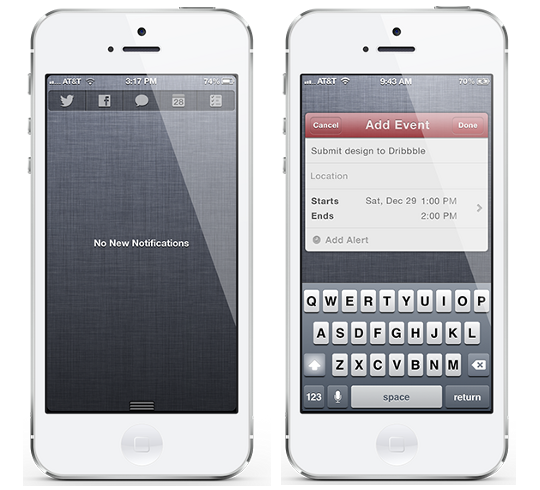
Before I adopted the iPhone I was a long time Android user, in fact my first iPhone was just last year when Sprint received the iPhone 4S. Despite earlier models not being available on my carrier, the one thing stopping me from making the switch was how notifications were handled; I hated the intrusive pop-up style found in iOS at the time, and was in love with Android's notification tray. Apple's introduction of the Notification Center sold me on the iPhone, and while it is great, there's much room for better functionality and improvement. And a beautiful new concept shows us, and Apple how this can be done.
In iOS 6 Apple added new Share Widgets for Twitter and Facebook to Notification Center, and while they're nice features, you can't help but wish they would have expanded on it. A new concept by human interface designer Joshua Tucker does this very thing; in addition to the ability to tweet and post to Facebook from Notification Center, Tucker has added support for sending text/iMessages, making a Calendar Event and setting Reminders.
Instead of text-based widgets, this concept features a beautiful and simple interface with icons for their respective applications. This not only is aesthetically pleasing, but it allows room for more application support, something we're all waiting for. Pressing one of these icons will result in a miniature pop-up of that application (just like the Twitter and Facebook share widgets do now), as seen with the Calendar app in the picture above. Just as you can customize which widgets appear in your Notification Center, this concept features the ability to change which applications are in your share widget.
The developer behind this amazing concept, Joshua Tucker writes:
Based on my own personal experience, having the ability to quickly add something important like a calendar event in a more efficient way helps me to be more organized, responsible, and productive. Based on human nature, I believe it's the same for everyone.”
He couldn't have said it better if he tried. This exact thing is something I've always dreamed of on my iOS device, it gets a little annoying double pressing that home button over and over again. If you have too, we may not have to dream much longer. Tucker announced that he has made plans to work with a developer in the jailbreak community to make this a reality, but has yet to select who.

Be sure to follow me on Twitter... @Jailbr3akHelper 

New Winterboard Theme: Auxo Michel


Cydia_Theme_Default_Icon-Auxo Michel

Name: Auxo Michel
Description: Auxo toggles with original multitasking style.
Version: 1.0
Author: michel00000 (Author of Spanish Toggles and International Toggles.)
Repo: ModMyi
Section: Themes (Apps)
Compatible: iOS 5 – iOS 6.0.1
Price: FREE

Auxo_Michel_Example

Thursday, January 3, 2013

New Winterboard Theme: 'Instagram Colors Icons'


Cydia_Theme_Default_Icon-Instagram Colors Icons

Description: Collection of 5 colors icons.
Version: 1.0
Author: CoOol_BoY (Author of Sneeze Message Tone, Twitter Colors Icons, WhatsApp Colors Icons, and many more.)
Repo: ModMyi
Section: Themes (Springboard)
Compatible: iOS 4.3.3 – iOS 6.0.1
Price: FREE

Instagram_Colors_Icons_Example

New Winterboard Theme: 'Apple Loading Bar Battery Theme'


Cydia_Theme_Default_Icon-Apple Loading Bar Battery Theme

-Description: Custom LockScreen battery graphics.
-Version: 2.0
-Author: iThemesGh (Author of Palestine Siri Mic Theme.)
-Repo: BigBoss
-Section: Themes (LockScreen)
-Compatible: iOS 5 – iOS 6.0.1
-Price: FREE

Apple_Loading_Bar_Battery_Theme_Example